
UI Optimization: How One Small Change Cuts 66% of User Effort
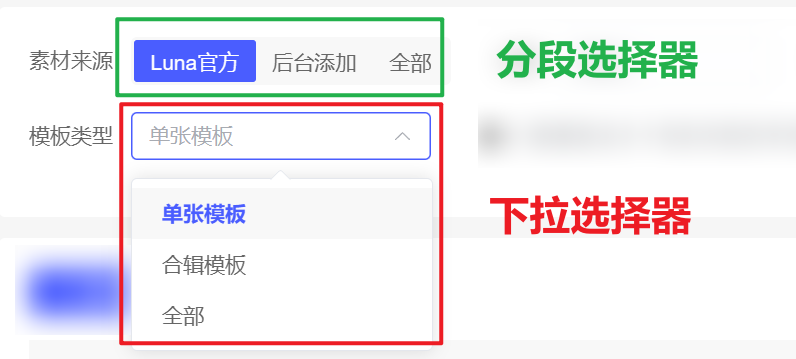
Most admin backends center on tables, with a top form that holds several filter inputs. Sometimes a field has only a few possible values. With a dropdown select, users cannot see all options at a glance, and when there are few choices the interaction is still more steps than necessary.
For example, choosing one option takes three steps:
- Open the dropdown and find the target
- Click the target option to confirm
- Click search
Can we optimize this to one step?
- Click the target option and trigger search
Yes!
Use a Segmented Control instead of a Select. Requires Element Plus 2.7.0+.
As shown below, all options are laid out flat; clicking a segment tab triggers search immediately.
When upgrading Element Plus, note that el-select is no longer compatible with the previous default width behavior in v2 — default width is lost and you must set width manually. After the upgrade, select styles across the project can break; this change drew a lot of community complaints.
See the discussion: Select lost its default width · Issue #15510